Turning Technology Frustration into Productivity


Did you know that 54% of employees say they lack confidence in their organization’s technology strategy, according to a study by KPMG?
If you’ve ever sat in front of your screen and thought “Why is this taking so long?”, you’re not imagining it… you’re part of a majority feeling the same way.
Technology only slows us down when we’re working for it, instead of letting it work for us.
Technology is supposed to make life easier, right? So why does it sometimes feel like it’s adding more work? Between updates, passwords, new tools, and unfamiliar systems, it’s easy to feel like you’re spending more time managing technology than actually using it.
But here’s the twist: technology can make things easier when we take the right approach. The key isn’t to fight against it, but to learn how to make IT work with us.
Whether you’re exploring it for yourself or helping others along the way, here are some strategies to bring confidence, clarity, and calm back into your digital day.
1. Simplify Before You Optimize
When everything feels complicated, it’s usually because there’s too much happening at once. New systems, multiple logins, and “just one more app” can turn simple tasks into puzzles. Before long, you’re spending more time managing your tools than actually using them.
That’s the hidden challenge of technology: it promises efficiency, but without focus, it can quietly create extra work. A dozen platforms that don’t talk to each other can slow you down faster than a single, well-connected system ever would.
That’s where integrated tools like Microsoft 365 or Google Workspace really shine. These platforms keep your work in one connected ecosystem where files, emails, calendars, and chats flow together seamlessly. Instead of juggling five apps, you’re working from one central hub. That simplicity saves time, reduces confusion, and builds confidence.
Start small. Focus on the tools that genuinely make your day easier and get comfortable with them first. Once they become second nature, it’s easier to layer on additional features or platforms with confidence instead of frustration.
Quick tips:
- Learn one key tool at a time and focus on the ones that actually solve a recurring problem.
- Ask: Does this tool make my work easier or just add steps?
Progress is great, but not at the cost of efficiency. Use technology to make your life easier, safer, or both, and take the time to make sure it truly improves what it’s supposed to.
2. Learning Without the Fear
That hesitation when you’re unsure about clicking something new? Totally normal. Technology can feel unpredictable, especially when the “wrong click” seems like it could cause a major issue.
The good news is that when your business has the right safeguards in place, those moments don’t have to be scary. Strong backup systems, user permissions, and clear recovery processes mean most mistakes can be undone. Files can be restored, settings can be reset, and data can be protected before damage ever occurs. These IT measures are huge confidence builders.
The best way to make technology less intimidating is to make learning safe. Encourage exploration, offer regular training, and make sure people know help is available when they need it. When mistakes are seen as part of learning instead of failures, curiosity and comfort naturally follow.
Confidence doesn’t come from avoiding mistakes; it comes from knowing you’re supported when they happen.
3. Speak the Same Language
Ever feel like your IT provider is speaking another language? You’re not wrong... Many terms thrown around in meetings or emails can feel like jargon. Learning a few key ones can help you make smarter decisions, ask better questions, and get the support you actually need.
Here’s a cheat sheet of IT terms that come up often in IT conversations:
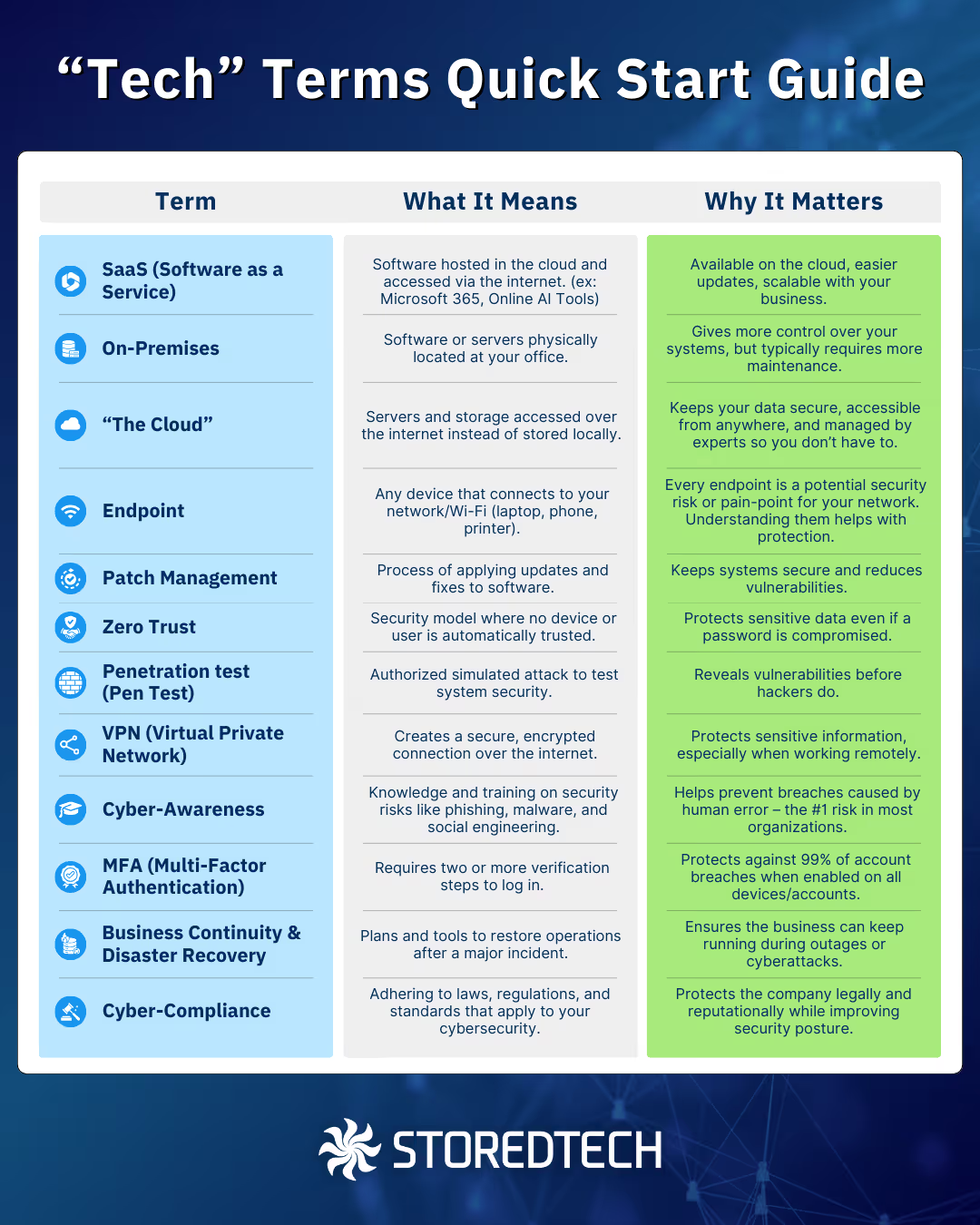
These terms aren't everything (there's always more to learn, we know), but learning the basics can help give you the confidence to interact with technology and technology experts MUCH easier. It also helps you understand the value of the services you’re utilizing.
4. Change Feels Better When It Feels Helpful
It can feel so much harder to switch to a new tool or service when you’re used to what you have. When a system works “well enough,” it’s natural to hesitate before switching and often the difference between a smooth transition and unnecessary frustration.
Try reframing new technology as an opportunity, not a disruption:

Ask: “How could this make my work easier or more efficient?”
Talk to your IT provider or internal support team about your workflow. Ask them what tools, automations, or integrations could reduce steps or eliminate repetitive tasks. Their job is to make your work smoother. Use their expertise to your advantage.

Look for small improvements like fewer clicks, faster workflows, or simpler collaboration.
Start by identifying one task that feels clunky or time-consuming. Then, explore if there’s a simpler way to do it. This could be as easy as syncing apps through your existing systems or using integrations you already have access to. Make each day a little smoother.

Give yourself and your team time. New tools often feel awkward at first, but become second nature with practice.
Change takes patience. Allow time for learning, ask questions freely, and celebrate progress as it comes. The more supportive the environment, the easier it is to build comfort and confidence with new systems.
Change becomes easier when the benefits are clear, even if they’re small at first. When teams focus on shared wins by sharing tips, offering patience, and celebrating progress adopting new technology becomes a growth opportunity for everyone.
5. Staying Secure: Small Habits Make a Big Impact
Cybersecurity doesn’t have to be intimidating, we want to build simple habits that protect you, your business, and make technology work for you. Small actions, consistently applied, can prevent big problems later.
Here are some practical steps every team can take:
- Require Multi-Factor Authentication (MFA) for Everyone: Add an extra verification step beyond just a password. It’s one of the simplest ways to block unauthorized access.
- Auto-Update Your Systems: Keeping your software and operating systems updated ensures you have the latest security patches without having to remember them manually.
- Create Regular Backups: Schedule automatic backups of important files. It’s like an insurance policy: if something goes wrong, you can recover quickly.
- Enable Firewalls & Access Controls: These act like security gates for your network, controlling who can access what. Properly configured, they limit exposure to threats.
- Increase Cyber-Awareness: Teach your team to recognize phishing emails, suspicious links, and social engineering attempts. People are often the first line of defense.
You don’t need deep technical knowledge to stay secure. With a few steady habits and a proactive mindset, you build a culture of security that protects your data, your business, and your peace of mind.
Getting Started with Confidence
Technology works best when it helps, not overwhelms. Each small step like setting up MFA, trying a new efficient workflow, or simply asking for help builds momentum and confidence. Tasks that once felt frustrating become routine, and efficiency naturally follows.
Getting started doesn’t require perfection. It starts with curiosity, patience, and the right support system. Mistakes aren’t setbacks; they’re opportunities to learn.
At StoredTech, we’re here to help businesses take those first steps and "make things make sense." From simplifying systems and connecting your business to platforms like Microsoft 365 to offering ongoing 24/7 support, our goal is to make technology simple, reliable, and empowering. All of this can feel very overwhelming, let us take care of your technology so you can focus on what you do best… running your business.
Confidence comes from progress, not perfection. Take the first step, build on it, and let technology become a partner in your success!
Latest Technology Trends and Strategies
Insights for leaders who want results.
.png)


Keep Your Business Running with 24/7 IT Support
Get reliability, security, and peace of mind from a partner that picks up every time. Fill out a quick form and get in touch with us today!