AI at Work: How to Use Artificial Intelligence Strategically and Ethically in Your Business


This is intended to be a plain-language guide to understanding, adopting, and utilizing artificial intelligence in your everyday work.
AI has begun to weeve itself into the fabric of everyday work. It drafts emails, summarizes hour-long meetings into a few bullet points, analyzes spreadsheets, and helps teams move faster than ever. Most people are already using it whether they realize it or not. It feels like it's in every major piece of software nowadays, doesn't it?
We think the conversation organizations need to be having right now is not whether to use AI. The question is: how do we use it well? How do we use it thoughtfully, strategically, and in a way that protects the people and data we're responsible for? Let's talk about how to approach AI and how to use it ethically and strategically.
What Is AI, Actually?
Before going any further, let's clear up a common misconception. AI tools like ChatGPT, Microsoft Copilot, and Google Gemini are not magic. They're not thinking or "understanding" your question the way a knowledgeable co-worker would.
What they do, in the simplest possible terms, is pattern matching. These tools have been trained on enormous amounts of text from the internet, books, articles, and more. When you ask them a question, they predict what a good-sounding response would look like based on all of that data. That's a powerful capability, but it comes with an important-to-know catch: AI can sound completely confident while being completely wrong. It doesn't fact-check itself. It doesn't know what it doesn't know. It produces output that sounds plausible, regardless of accuracy.
Treat AI as a capable collaborator that can do a lot of heavy lifting, not as a source of truth. Everything it produces needs a human eye on it before anyone acts on it.
Where Can it Help Right Now?
Start with this: What is one task you do every day that takes up a lot of time?
For most people, the answer points directly to where AI can start adding value immediately. The most common and proven use cases are less glamorous than the headlines suggest, but they're genuinely useful:
- Drafting and refining emails, especially when you're staring at a blank page trying to find the right tone
- Summarizing long documents or meeting recordings to get the key points without reading every word
- Creating first drafts of job descriptions, internal documentation, and marketing outlines
- Analyzing spreadsheets and reports to surface trends in plain English
- Managing your inbox by condensing long threads and shaping replies faster
Every team finds different efficiencies once they start applying AI consistently to their specific workflows. The above is a practical starting point, not a ceiling.
Also, when AI works well, it fits into how people already work rather than becoming another system to manage.
The Art of Asking AI the Right Way
The quality of what you get out of an AI tool depends almost entirely on the quality of what you put in. A vague, one-sentence prompt produces a vague, generic response. Specific instructions with real context produce dramatically better results.
Think of it like onboarding a new employee. If you hand them an assignment with zero background information, the result will probably be mediocre, not because they can't do the work, but because they didn't have enough to go on. AI works the same way.
A strong prompt includes three things:
- Context: Who is this output for, and where will it be used?
- Intent: What kind of response do you need? A summary? A first draft? A list of options?
- Reasoning: Why does this matter, and what is the end goal?
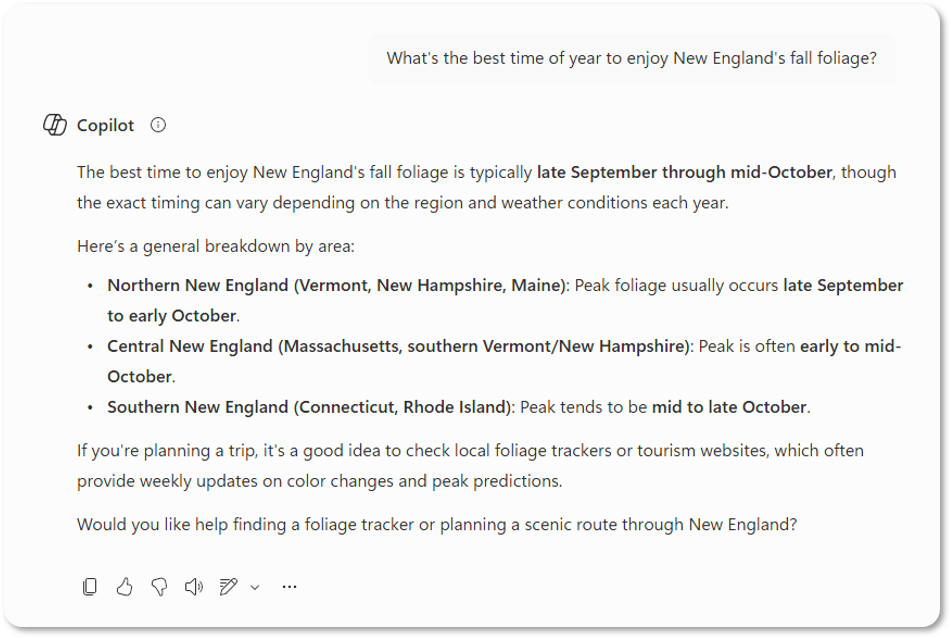
Weak prompt: "What's the best time of year to enjoy New England's fall foliage?"
Strong prompt: "You are an experienced wildlife biologist specializing in trees. Based on recent weather patterns in the USA, predict the best fall foliage season for New England. Explain it to a class of kindergarteners."
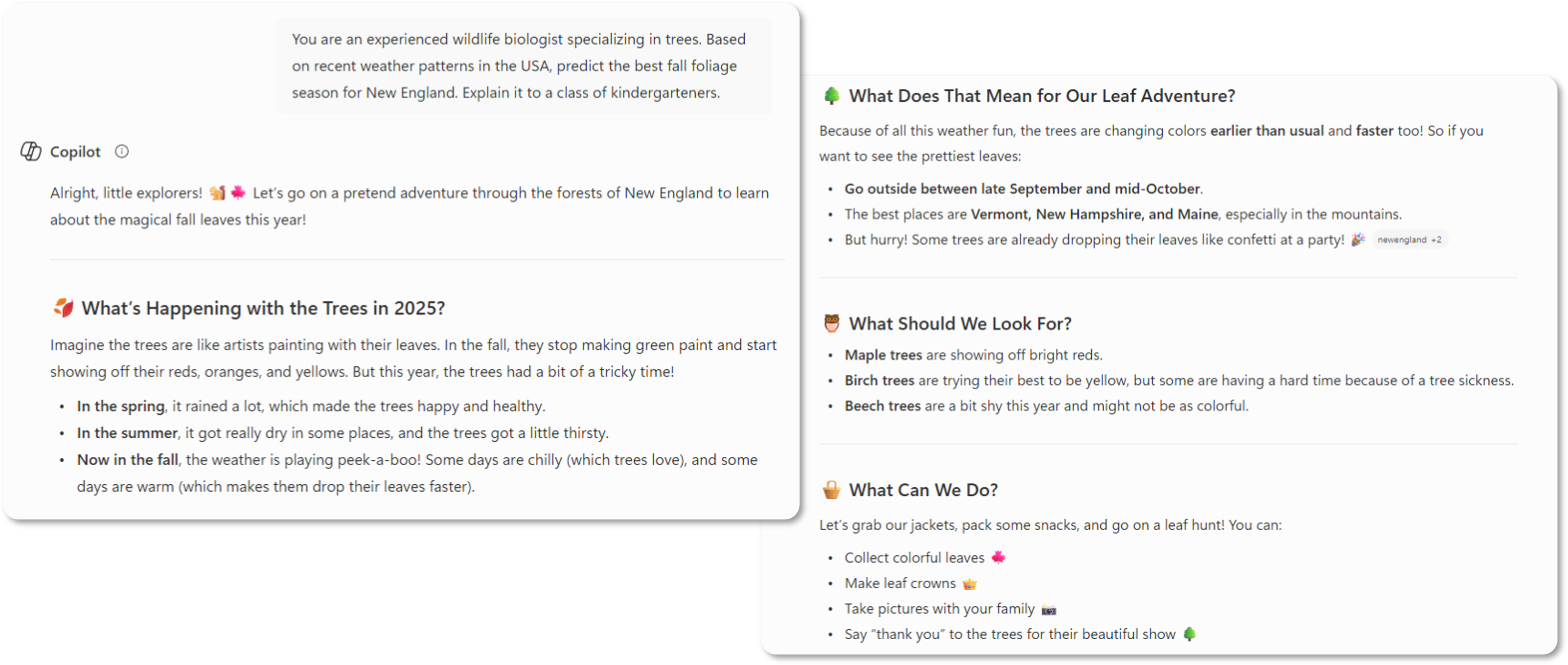
See the difference? The more specific and human your prompt is, the more useful the output will be. An easy way to remember what we said before is "Quality In = Quality Out."
A Cautionary Tale Worth Knowing
A few years ago, a practicing attorney in Manhattan submitted a legal brief to a federal court citing six specific case precedents. None of those cases actually existed. ChatGPT had fabricated them, complete with case names, courts, and dates, and the lawyer submitted them without verifying a single one.
The consequences included public embarrassment and potential disciplinary action. More to the point, it illustrated what happens when humans hand over too much responsibility to a tool that cannot verify its own accuracy. AI presents information with the same confident tone whether it's accurate or completely made up. Anything factual, legal, financial, or strategic must be independently reviewed before it's shared or acted upon. Always, always check your ouputs!
The Ground Rules for Responsible AI Use
Responsible AI use protects your organization and your clients. At a minimum, it requires:
- Using AI as an assistive tool, with a human as the final decision-maker before anything is published or sent
- Verifying outputs before sharing them or acting on them
- Keeping sensitive, confidential, or regulated data out of tools that haven't been vetted for security and compliance
- Being transparent about when and how AI was involved in your work
These are part of modern risk management. Please don't treat these as optional extras.
Important: Where Does Your Data Go?
This is one of the most under-discussed issues in AI adoption.
When employees use free consumer AI tools, such as the free version of ChatGPT or any tool they signed up for with a personal email, there is a good chance the prompts and data they're entering are being logged and used to improve those tools' models. Internal documents, customer information, proprietary strategy, all of it can potentially leave your organization's control.
Without clear organizational standards, employees will naturally use whatever tool is fastest and most accessible. That creates compliance, privacy, and security risks that are difficult to unwind once they take root. A clear AI policy, one that defines which tools are approved and what data can be used with them, matters far earlier than most organizations expect.
The Big Three
If you're evaluating which AI tools your organization should use, here's a breakdown of the three major platforms and the difference between their enterprise (business) and consumer (personal or free) versions.
Google Gemini
Enterprise (Google Cloud / Workspace): Your data stays yours. Prompts and outputs are not used to train Google's models. Governed by enterprise contracts, encryption, and access controls, and designed for organizations with compliance requirements.
Consumer version: Interactions may be logged to improve services. Publicly available data can be used for training. Not recommended for sensitive business use.
ChatGPT (OpenAI)
Enterprise version: Prompts and outputs are not used for training. Data is logically isolated per organization and covered by enterprise-grade agreements. Can be suitable for confidential business use.
Free and Plus versions: Prompts and uploaded content may be used to improve models unless you manually opt out. Not recommended for sensitive or regulated business data.
Microsoft Copilot
Microsoft 365 Copilot (Work): Only accesses data you already have permission to see. Prompts and outputs are not used to train foundation models. Covered by Microsoft's enterprise security and compliance commitments.
Consumer version: Interactions may be logged to improve products. Governed by consumer privacy policies. Not intended for confidential or regulated business use.
Case Study: StoredTech
When StoredTech as a whole first looked at AI internally, usage was fragmented. Employees were independently using various tools to create better workflows without any standardization.
As a company, we made a deliberate organizational choice: standardize on Microsoft 365 Copilot as the company-wide platform, establish clear policies, and build from there. More advanced capabilities followed, including Power Automate workflows and AI-driven data analysis.
Here's what we saw:
- Speed of service improved. Automated fixes and faster solution deployments reduced response and resolution times across the board.
- Client communication became more consistent. AI-assisted drafting integrated directly into Microsoft Teams reduced variability in how clients were addressed.
- Coverage expanded. Automation allowed the team to support clients more reliably without adding strain on staff.
For us, Microsoft Copilot created the opportunity for us to safely use AI and use it in a way that actually enhanced our day-to-day work without replacing the most important aspect of any business - the people. Intentional, standardized adoption with clear policies and measured outcomes consistently outperforms informal, scattered experimentation.
How to Get Started
You don't need to overhaul everything at once. A focused, deliberate approach works better than a big-bang rollout.
- Create clear AI use policies and define which tools are approved for business use, before employees make those choices on their own
- Draw a clear line around your data and decide explicitly what can and cannot be entered into AI tools
- Build a focused 90-day adoption plan centered on real, specific workflows rather than hypothetical use cases
- Measure outcomes including time saved, quality improvements, and employee adoption rates
AI will keep evolving. Over the next few years, expect more agent-based automation (AI that can complete multi-step tasks on its own), deeper integration across platforms, and tools that require less human instruction. The organizations building good habits now will be better positioned to absorb those changes without disruption.
The core principles like verifying outputs, protecting your data, and most importantly - keeping humans in the loop will hold regardless of how the tools change.

Have questions about implementing AI in a way that is secure, ethical, and aligned with your business goals? Let's talk.

.jpg)

Keep Your Business Running with 24/7 IT Support
Get reliability, security, and peace of mind from a partner that picks up every time. Fill out a quick form and get in touch with us today!