Your Email Security Upgrade: Moving from Barracuda to INKY

We're upgrading the technology that protects your email, moving from Barracuda to INKY. This FAQ covers what's changing, what (if anything) you need to do, and how to make the most of INKY's features.
About the Change
What's happening?
We're replacing your current email security service, Barracuda, with INKY. INKY protects your inbox from phishing and unwanted mail, and adds several helpful new features along the way.
Do I need to do anything?
For the switch itself, no. Our team handles all the technical changes behind the scenes. You'll simply start seeing INKY instead of Barracuda protecting your email.
Will my email stop working during the change?
No interruption is expected. The change is brief and closely monitored, and we validate everything immediately afterward to confirm your mail is flowing normally.
Will my email address, mailbox, or the way I send and receive mail change?
No. Everything about how you use email day to day stays the same. The only visible difference is what you'll see on incoming messages (more on that below).
Is my bill changing?
No. INKY is provided at the same cost as Barracuda.

What You'll Notice
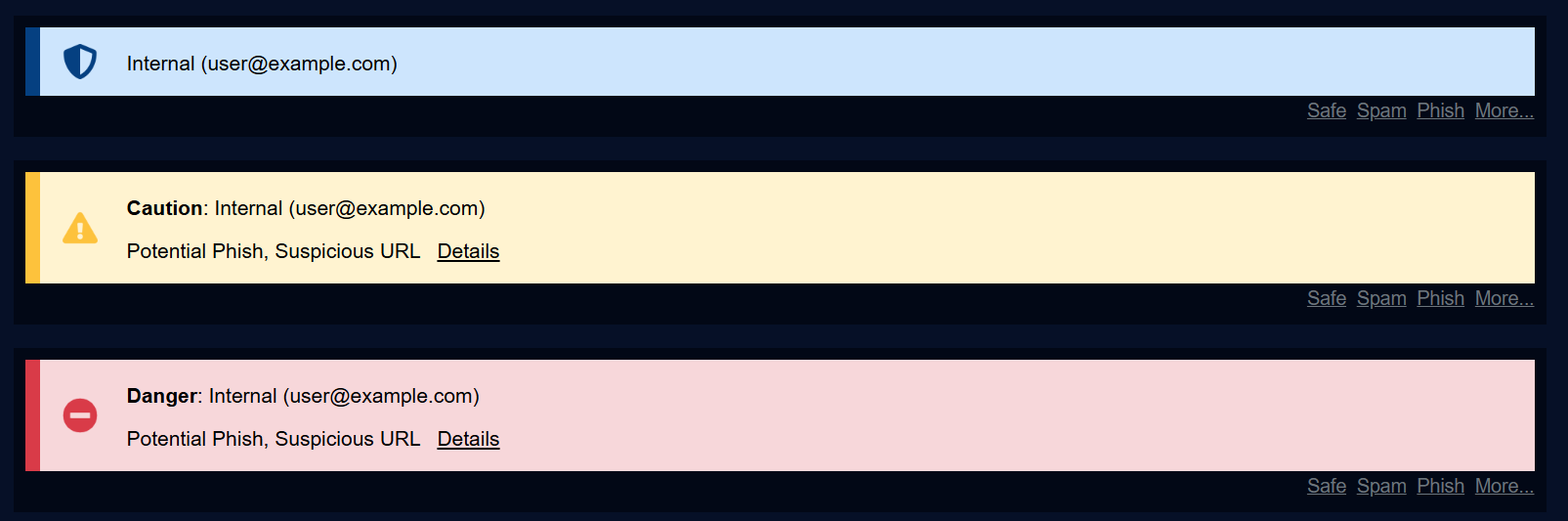
What are those colored banners on my emails?
INKY adds a banner to certain messages to help you quickly understand what you're looking at - for example, flagging a message that looks suspicious, or one that's simply a newsletter or promotion (see “graymail” below). Here are the banners you may see:


What is “graymail”?
Graymail is the term for newsletters, promotions, and other bulk email that isn't dangerous - just clutter. INKY can identify it and flag it with a banner so you can decide what to do with it.
Can I get graymail out of my inbox automatically?
Yes. From a graymail banner, click Details, then User Dashboard. In your dashboard, check the box to enable automatic graymail routing. INKY will create a dedicated folder and sort future graymail into it for you - no setup required beyond checking the box.
A message got sorted incorrectly - what do I do?
Click the Report link on the message. This corrects it and helps INKY learn for next time.
Where do I manage my personal settings?
In your User Dashboard, reached by clicking Details → User Dashboard from any INKY banner.
Encrypted Email
I use encrypted email - what's changing?
Going forward, encrypted email is handled through the INKY Pro encryption portal instead of Barracuda's. Once the switch is complete, you won't need to do anything differently to send or receive secure email. Continue to use your subject-line trigger word to send encrypted messages.
What happens to encrypted emails I already sent or received through Barracuda?
This one is important: any previously encrypted messages accessed through the Barracuda portal will no longer be available after the transition is complete, and this deadline cannot be extended.
What should I do?
If you have encrypted messages in the Barracuda portal that you need to keep, open and save, forward, or export them before the deadline you've been given. If you haven't received a specific date and believe this applies to you, please contact us right away.
Quarantine & Filtering
What happens to emails currently held in Barracuda's quarantine?
You'll have a limited window after your transition - communicated separately, typically about two weeks - to release anything you still need from the old quarantine. After that window closes, it will no longer be accessible.
A sender I trust is suddenly being flagged - is that normal?
It can happen right after the switch, since INKY's filtering works a little differently than Barracuda's. Use the Report link to correct it; this fixes it going forward.
Is INKY replacing my antivirus or other security tools?
No. INKY specifically protects your email against phishing, unwanted mail, and related threats. It doesn't replace other security tools you may already have in place.
Getting Help
Who do I contact with questions or issues?
Reach out to us! If you have a question that isn't answered here, please let us know - we're happy to help.
.jpg)
Keep Your Business Running with 24/7 IT Support.
Get reliability, security, and peace of mind from a partner that picks up every time. Fill out a quick form and get in touch with us today!